E3AS-HF Output Timer
Internal timer functions of the E3AS-HF

Written by Christopher Free
Updated at March 31st, 2026
The E3AS-HF Time of Flight Sensor has built in timer functions that can be used to alter the timing of the output once an object is detected. This article explains these different options and how to configure it.
Timer Modes and Charts
The Sensor has four select-able modes for the timer function
| Mode | Description |
| Off | No timer function, outputs are switched at detection |
| On Delay | The output switching is delayed by the set time period after detection |
| Off Delay | The output is switched upon detection and then held for the set timer period after the object has passed |
| One Shot | The output is switched upon detection and held for the set period of time |


Setup
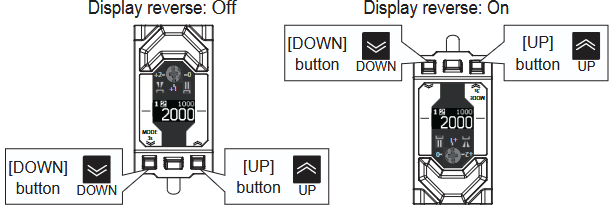
- Press and hold the Down button for 3s to bring up the settings menu
- Use the Up or Down buttons to navigate the settings menu until you locate “Output 1 Timer Mode”. Press the Teach button (center button) to begin changing this mode.
- Cycle through the timer modes using the Up and Down keys and press Teach to accept any changes.

- Once the timer mode has been set, navigate down to the “Timer Time1” to set the duration
- Press and hold the Down button for 3s to exit the setting menu.