Sysmac Studio Lite vs. Standard

Written by Barbara Garnier-Jay
Updated at August 13th, 2026
Edition comparison
Sysmac Studio Lite and Standard editions largely differ by the PLC series they are compatible with.
Sysmac Studio Lite edition only allows to open, edit and synchronise projects for the following series:
- NX1P2
- NX102
- NJ101
Sysmac Studio Standard edition is compatible with all NX and NJ series, including:
- NJ301
- NJ501
- NX502
- NX701
- NY5
Minor differences
| Feature |
Sysmac Lite |
Sysmac Standard |
|---|---|---|
| Adept Robot IP Address Setting Tool |
No | Yes |
| FH and FHV vision system programming | No | Yes |
| GX network CompoNET | No | Yes |
| E3 N smart sensors |
No | Yes |
| ZW series measurement sensors |
No | Yes |
Sysmac upgrade to Standard edition
Sysmac Studio Lite can be upgraded to Standard by purchasing a Standard license. Reinstalling Sysmac Studio is not required.
Project conversion to Lite edition
Projects built for by a Standard edition can be converted to a Lite-compatible project by changing the PLC in the project to a PLC compatible with Sysmac Lite. However, this can only be done using a Standard edition.
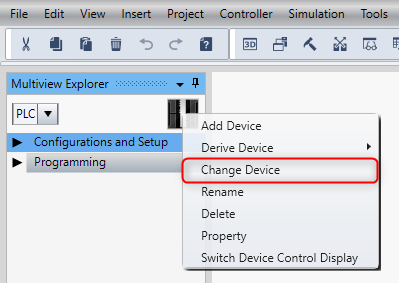
Right-click on the device in the Multiview Explorer, select Change Device.
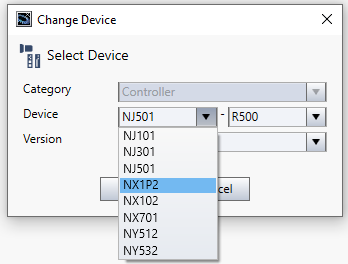
Select a PLC compatible with Sysmac Studio Lite edition (NX1P2, NX102 or NJ101).
Please get in touch with an Omron engineer to convert a Standard edition project to a Lite edition project for you.