Contact Us

If you still have questions or prefer to get help directly from an agent, please submit a request.
We’ll get back to you as soon as possible.

Please fill out the contact form below and we will reply as soon as possible.

  • Contact Us
  • Home

E3AS-HF Sensitivity

Adjusting the sensitivity of the E3AS-HF Sensor

Written by Christopher Free

Updated at March 31st, 2026

Contact Us

If you still have questions or prefer to get help directly from an agent, please submit a request.
We’ll get back to you as soon as possible.

Please fill out the contact form below and we will reply as soon as possible.

  • Products
    Automation Systems Control Components Motion & Drives Quality control & Inspection Robotics Safety Sensing Services Software Switching Components
  • Amplify e-Store
    e-Store public
  • Public CSC
+ More

This article will explain the steps to adjust the sensitivity of the E3AS-HF Sensor.
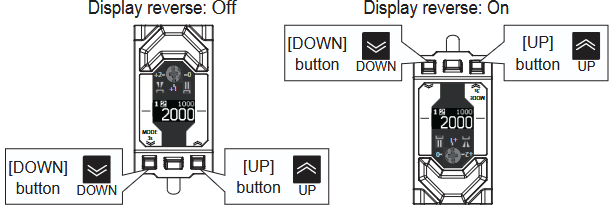
 

  1. Press and Hold the Down button for 3 seconds
  2. Using the Up or Down button (short press), navigate until you see an “Adv. Setting” option.
  3. Enter into this using the teach button (short press) and toggle it to “On” using the arrow keys
  4. There will now be more options available in the settings, navigate until you locate “Sensitivity”. Using the same methods above, enter into this setting and select the desired sensitivity level.


Delete

Noteworthy

If the response time of the sensor is set to 2ms, then the Sensitivity is locked to “Very High”


responsiveness e3as-hf

Was this article helpful?

Yes
No
Give feedback about this article

Related Articles

  • Does the Intelligent Tap need to remain connected to the F3SG-4SR Light Curtains?
  • How to set up F3SG-PG A or P model light curtain muting system
  • What is the difference between F3SG-SR range light curtain and PG range light curtain?

Definition by Author

0
0
Expand